
So, now that I’d dipped my toe in the water with the RTL2832U on Win10, I actually planned on permanently integrating it into my media setup with is based on a RPI3 running OpenElec and a Debian server providing backend storage.
This turned out to be one of those good news bad news situations. The good news is that the dongle has kernel support, the bad news was that Wheezy was still on 3.2 which was lacking this support. After a failed attempt to compile the driver, followed by a failed attempt to compile the kernel (stupid linux-headers not found!) I just went ahead and upgraded the box to Jessie (Linux 3.16.0-4-amd64 #1 SMP Debian 3.16.7-ckt25-1 (2016-03-06) x86_64 GNU/Linux).
A long update, upgrade, dist-upgrade later and the dongle was in and recognised
[    1.196017] usb 8-1: Manufacturer: Realtek
[   19.650428] usb 8-1: dvb_usb_v2: found a 'Realtek RTL2832U reference design' in warm state
[   19.717623] usb 8-1: dvb_usb_v2: will pass the complete MPEG2 transport stream to the software demuxer
[   19.717658] DVB: registering new adapter (Realtek RTL2832U reference design)
[   19.721246] usb 8-1: DVB: registering adapter 0 frontend 0 (Realtek RTL2832 (DVB-T))...
[   20.007861] i2c i2c-9: rtl2832_sdr: Realtek RTL2832 SDR attached
[   20.015340] input: Realtek RTL2832U reference design as /devices/pci0000:00/0000:00:1d.7/usb8/8-1/rc/rc0/input6
[   20.015348] rc0: Realtek RTL2832U reference design as /devices/pci0000:00/0000:00:1d.7/usb8/8-1/rc/rc0
[   20.104268] input: MCE IR Keyboard/Mouse (dvb_usb_rtl28xxu) as /devices/virtual/input/input7
[   20.104356] usb 8-1: dvb_usb_v2: schedule remote query interval to 400 msecs
[   20.117509] usb 8-1: dvb_usb_v2: 'Realtek RTL2832U reference design' successfully initialized and connected
[   20.117602] usbcore: registered new interface driver dvb_usb_rtl28xxu
[   20.160507] rc rc0: lirc_dev: driver ir-lirc-codec (dvb_usb_rtl28xxu) registered at minor = 0
Next step…
Installing tvheadend
My original plan was to just have the dongle running directly connected to the RPI but power was a concern (no powered hub) and since my linux server is always running anyway, why not install the backend software there and have the tvheadend client running on the RPI/OpenELEC side of things?
Installation isn’t actually that straightforward but can be broken down into a few steps
- Install the package
This involves adding the tvheadend repository to your sources list and you will add a user account/password as part of the install processsudo apt-key adv --keyserver hkp://keyserver.ubuntu.com:80 --recv-keys 379CE192D401AB61 echo "deb https://dl.bintray.com/tvheadend/deb <strong>jessie stable</strong>" | sudo tee -a /etc/apt/sources.list sudo apt-get update sudo apt-get install tvheadend
- Configure via the web interface at <IP Address>:9981
- Check that your dongle shows up under Configuration -> DVB Inputs -> TV Adapters
- Under Configuration -> DVB Inputs -> Networks, add a DVB-T network (for Ireland) and select from the list of Pre-defined MUXs (Ireland-WoodcockHill for me)

- Back under Configuration -> DVB Inputs -> Networks, map the newly created network to the dongle

- Under Muxes, the scan status for the added muxes will start at ‘Idle’ then eventually start scanning and find your channels
- You should see the Services start to be listed as they are discovered, and at this point under Configuration -> Channel, you can map the service to a channel

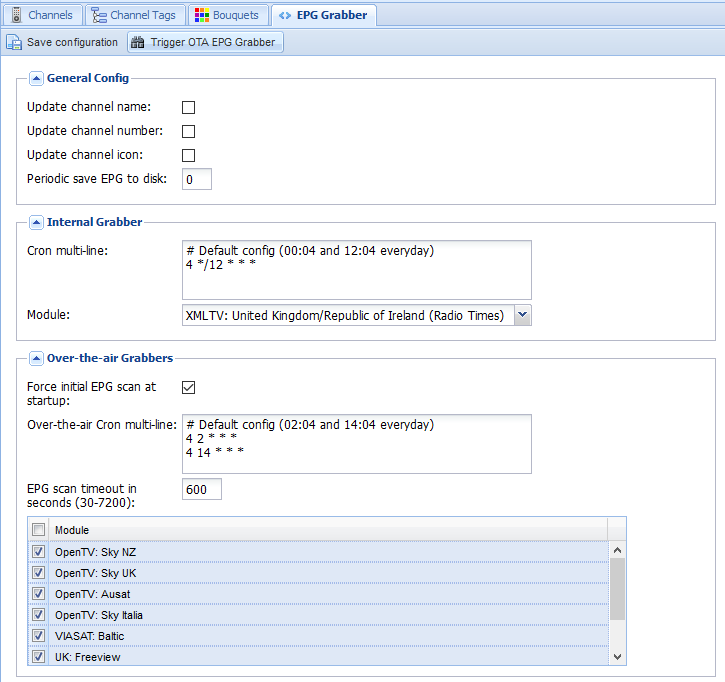
- Last step on the backend side is to enable the EPG. I have both the OTA grabber and the Radio Times for UK/Ireland enabled and we are done

On the OpenELEC frontend, much simpler.
Install the add-on from under PVR, configure it with the hostname, username, and password, and under Settings -> TV, Enable live TV. Sorted!


